How to Optimise Your Video Podcast for Maximum Discovery in 2026





Introduction
Video has become particularly important to podcasts in recent years. Recent data shows that only 10% of Gen Z claim to not watch video podcasts, meaning a huge 90% do. With more and more listening platforms offering video content to keep up with this demand, mastering the art of optimising your podcast is vital to ensure discovery.
The Role of YouTube
Audio is far from dead, in fact, podcasting is experiencing one of its biggest booms to date, with around 4.7 million active podcasts worldwide and over 300,000 new shows launched every month.
Throughout the boom, the methods of discovery have shifted. There is a heavier focus on a podcast’s ability to hook in and engage listeners and maximise retention. 70% of podcast consumers use YouTube to watch or listen to podcasts, and it also currently ranks as the no.1 platform for podcast discovery.
For podcasters, the YouTube opportunity acts as the “top of the funnel”. While audio-first platforms like Spotify and Apple Podcasts remain popular for long-term consumption, listeners are finding their new favourite podcasts through YouTube first.
Between YouTube Shorts, the algorithm, and the platform’s search engine, YouTube has fast become one of the most effective platforms for podcast discovery, introducing thousands of new listeners to shows.
What is Visual Metadata?
Metadata is the structured information linked to your audio or video file that helps platform algorithms (like Google, YouTube, Spotify) to understand and accurately categorise your content for internet users.
Why is it Important?
Metadata helps search engines find and reference your content by providing specific details like the title, description, and author. By helping platforms accurately categorise your content, metadata transforms otherwise hidden audio into a searchable, clickable asset that is easier for your target audience to find and engage with. This strategic optimisation is crucial to vastly improving your podcast’s discoverability.
Visual metadata is the graphical and structural elements that help viewers understand and engage with your video content. Optimising your visual metadata has several core benefits:
Engagement
Like a blurb on a book, a thumbnail is your first (and sometimes only) chance to capture viewers. High-quality visuals attract and retain viewer attention, driving a high Click-Through Rate (CTR).
User Experience
Clear thumbnails and dynamic visuals allow viewers to comprehend complex topics of discussion faster, keeping them watching for longer.
Discoverability
Properly labelled visual content helps AI search engines better categorise your content, ensuring it appears in the “Podcasts” section and is relevant to user recommendations.

How to Master YouTube Podcasts
There are two ways of establishing podcast on YouTube.
Method 1: Creating a Podcast From Scratch on YouTube Studio
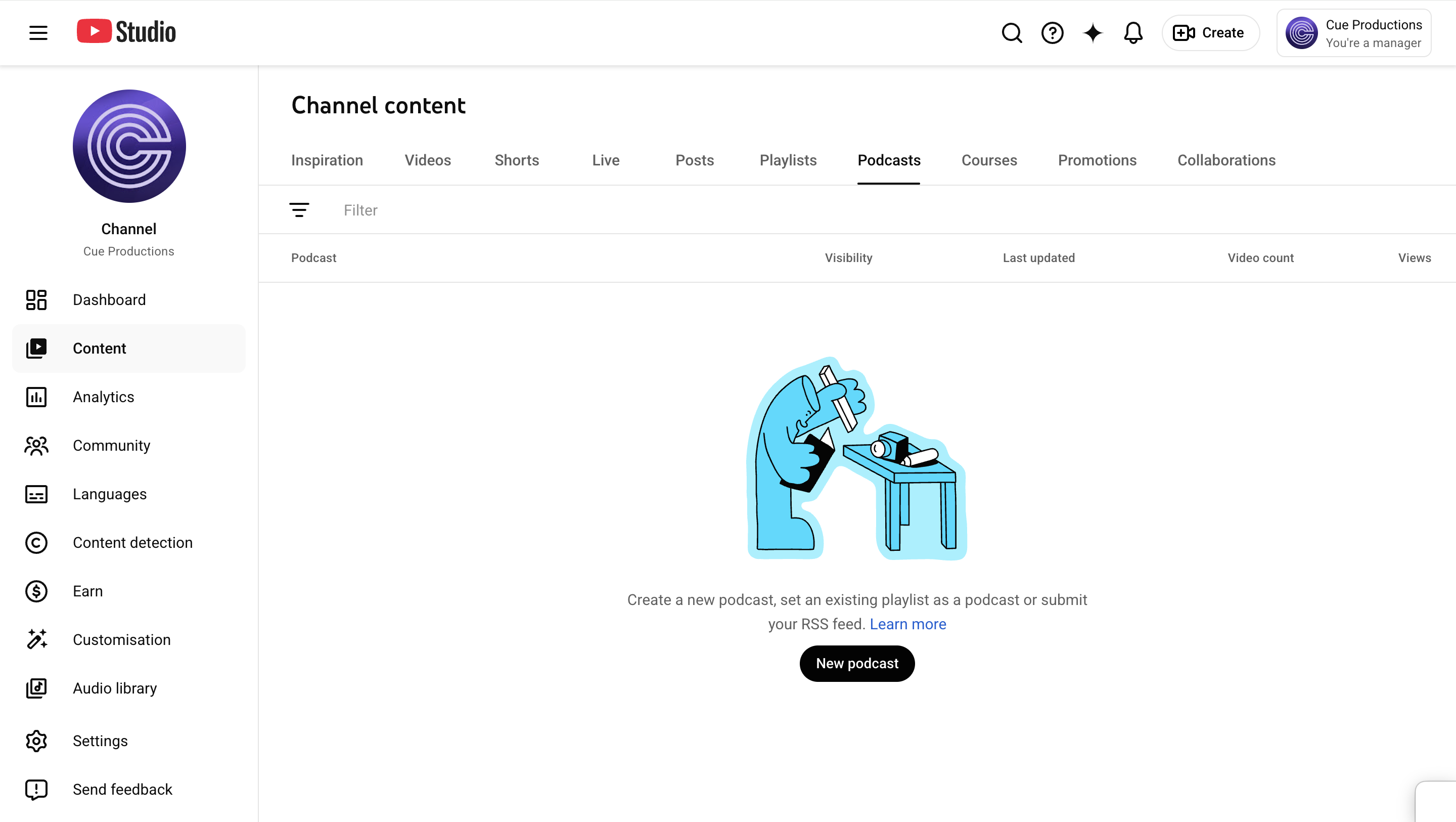
- In YouTube Studio, find the “Create” button and click “New podcast”.
- Then select “Create a new podcast”. This will make a new playlist which is where your show will be located.
- Enter your show’s details like its title and description. For the Visibility tab, set this to “Public” so your podcast isn’t hidden from anyone.
- The thumbnail is a key part of the visual metadata which will help with discoverability. It can also serve as consistent official cover art for your podcast. Choose a high-resolution square image (ideally 1280x1280). Take your time creating something that connects to your brand and your image.
- Finally, upload your episodes to your podcast playlist. Click the “Create” button, select “Upload videos” and transport the audio or video files onto YouTube. Make sure any new episodes are added to the podcast playlist.
Method 2: Connecting a Pre-Existing Podcast via RSS Feed
If you already host your podcast on a platform like Spotify, you can transport the show to YouTube using an RSS feed.
- In YouTube Studio, select “Create” and then “New podcast”.
- Select “Submit your RSS feed” and paste your feed’s URL. This is usually found in the settings of your podcast hosting platform.
- YouTube will then send a verification code to the linked email address on the RSS feed.
- Once you have verified ownership, YouTube should sync all the episodes found in your feed and upload them to a podcast playlist on your channel. It will also create a static-image video for each episode, using existing cover art.
Note: This connection is continuous. When you publish future episodes to your RSS feed, YouTube will automatically sync the video version to your channel.
Managing and Optimising Your Podcast SEO
Optimising your podcast SEO helps search engines to read your content and users to find it. Once discovered, an effective SEO strategy can also retain and transform your audience into loyal listeners.
Some of the core ways to integrate SEO into your podcast strategy are:
Titles & Descriptions
Identify several keywords that relate to your content and reflect what potential listeners are searching for. Incorporating these words into your titles, episode descriptions, and show notes gives search engines and users multiple different opportunities to surface your content.
Timestamps & Chapters
Pinpointing key moments breaks long episodes into bite-sized chunks, making it easier for search engines to surface specific segments to users. For example, one podcast episode could have six earmarked sections, with each section acting as another entry point for new listeners.
Transcripts
Including transcripts for your episodes not only improves accessibility, but also provides search engines with thousands of words to analyse and index. Transcripts in different languages will extend this reach across the world.
Linking
Including internal or external links to more episodes or sources emphasises your authority as a creator in that specific field or industry.
To read more about SEO for podcasting, read our article on the 10 best practices for optimising your podcast SEO.

Why Thumbnails are Essential for B2B Podcasts
A thumbnail is a small image preview, designed to give viewers a quick visual impression of your content. When users click on the thumbnail, this directs them to the full content, for example, a podcast episode.
Because of this, thumbnails can heavily dictate your podcast’s discoverability. Dynamic, interesting thumbnails often influence more viewers to click on your content, which increases your content’s CTR. In turn, a high CTR improves the chances of search engines finding and recommending your content to users.
In B2B podcasting, thumbnails do the job of communicating the brand’s authority and value immediately.
Click-Through Rate
An interesting, high-quality thumbnail can improve your CTR (Click Through Rate). In a professional context, users are usually looking for solutions to specific problems. If your thumbnail is unclear or unprofessional, you lose authority before users have even clicked.
Search Visibility
Content with a high CTR signals to YouTube that your content is valuable, meaning the search engine is more likely to rank your podcast higher in searches.
Brand Recognition
Using a consistent template (same fonts, style, layout) for your thumbnails, creates professional familiarity and builds trust. When users scroll past your content, they should recognise your brand immediately.
Visual Preview
In a world where time is scarce, thumbnails allow users to make faster, more informed decisions about whether your content is relevant to their needs.

Why YouTube is the Primary Search Engine for Long-form Audio
YouTube has grown from a general video sharing platform to a powerful search engine. Often, when you use the Google search engine, YouTube videos will crop up in the search results anyway, so internet users have started going straight to the platform for their searches.
Advantage of Visual SEO
On YouTube, your audio content can become searchable data. The platform’s AI technology automatically transcribes your podcast episodes and videos. If a user searches for a niche topic or phrase mentioned in a podcast conversation, YouTube can pinpoint that exact moment and surface it in search results.
Chapter Segmentation
On YouTube, creators can label sections of their content, allowing individual content chapters to appear in search results. This significantly improves the user experience by letting them jump to the segment they need and also reduces the barrier for entry.
The “Recommended” Sidebar
Most of us are familiar with a “YouTube Rabbit Hole”. The platform uses Semantic Search Intent to understand the intention behind users’ viewing habits. By analysing your content’s metadata and transcripts, YouTube can recommend your podcast to users based on their watch history and interests, even if they didn’t specifically search for you.
Conclusion
In 2026, podcasts need to be discoverable to be successful. By optimising your content using thumbnails and transcripts, you can turn your content into a searchable asset.
YouTube is a powerful discovery engine. By utilising this, and mastering its SEO and visual metadata ensures your brand’s expertise reaches your target audience.
At Cue Productions, we want to help your story be heard. We guide you throughout the process, from idea generation to distribution. Our team can provide you with effective high-performance strategies for platforms like YouTube, to amplify your brand’s authority and ensure your content doesn’t get lost in the archives.
Book a call with Cue today to start your podcast journey.